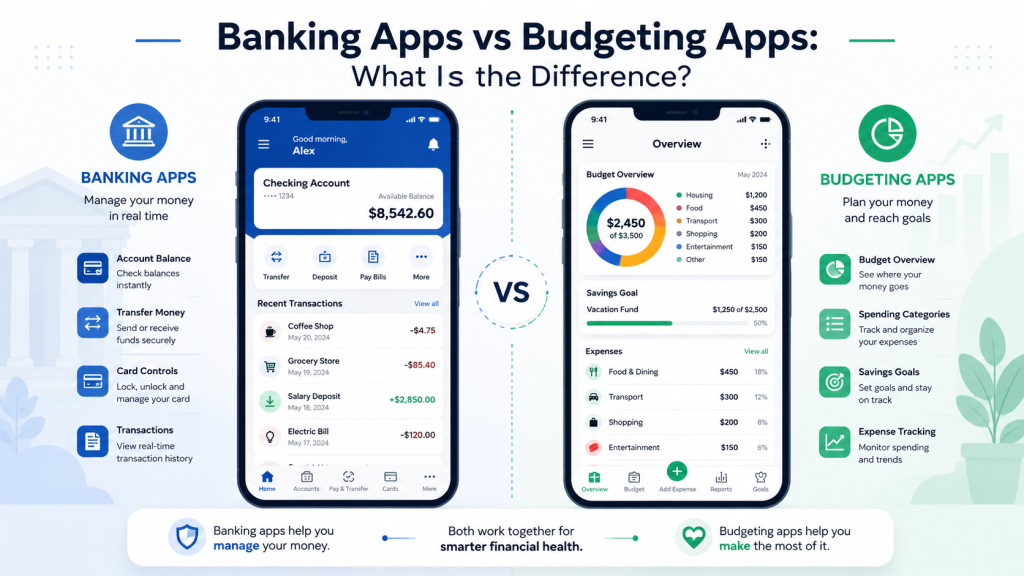
Banking apps and budgeting apps can both help you manage money, but they are not the same thing.
A banking app is usually provided by a bank, credit union, or financial institution. It helps you access and manage your bank account.
A budgeting app is usually designed to help you track spending, organize expenses, create budgets, monitor goals, and understand your money habits.
For beginners, understanding the difference can help you choose the right tool for your financial needs.
This guide explains the difference between banking apps and budgeting apps in simple terms.
Why the Difference Matters
The difference matters because each type of app has a different purpose.
A banking app is mainly used to manage your actual bank account.
A budgeting app is mainly used to organize and understand your money.
If you only need to check balances, transfer money, deposit checks, or pay bills, a banking app may be enough.
If you want to track spending, create a monthly budget, monitor categories, or build better money habits, a budgeting app may be more helpful.
Some people use both.
The key is to understand what each app does before signing up or connecting accounts.
What Is a Banking App?
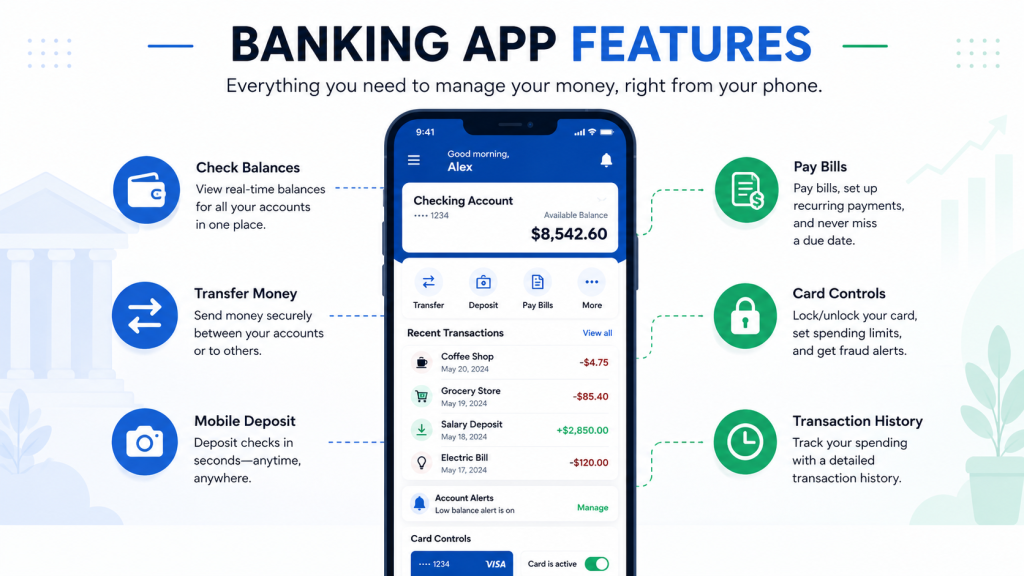
A banking app is a mobile app from a bank, credit union, or online financial institution.
It usually connects directly to your checking account, savings account, debit card, or other bank products.
A banking app helps you manage money that is already held at that financial institution.
Common banking app features may include:
- Checking account balance
- Savings account balance
- Transaction history
- Mobile check deposit
- Money transfers
- Bill payment
- Debit card controls
- ATM locator
- Account alerts
- Direct deposit information
- Zelle or peer-to-peer payments
- Customer support access
A banking app is usually focused on account access and account activity.
It helps you manage your bank relationship from your phone.
What Is a Budgeting App?
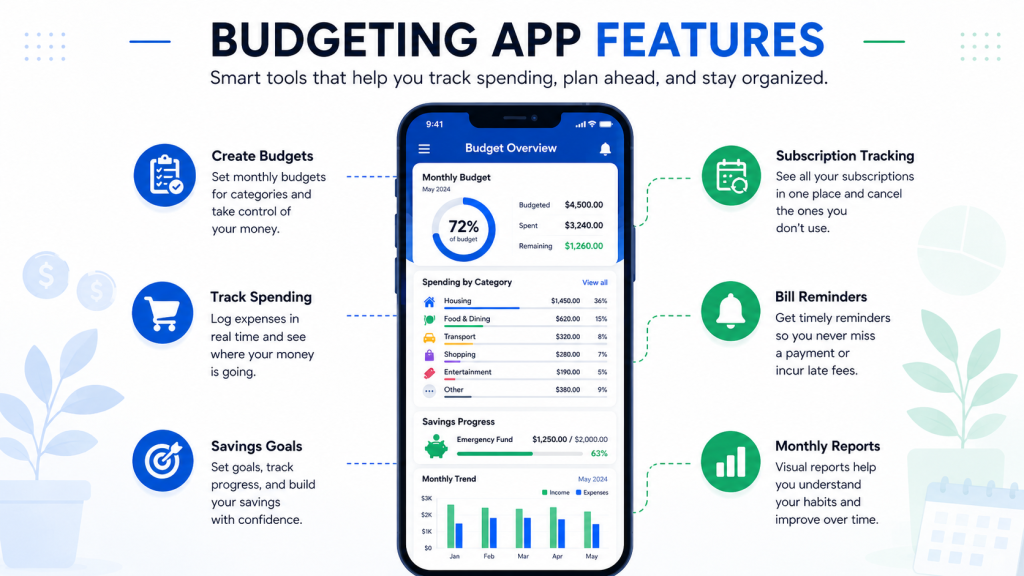
A budgeting app is a tool that helps you organize your money.
It may connect to your bank accounts, credit cards, loans, and other financial accounts, or it may allow manual tracking.
A budgeting app is usually focused on spending habits, categories, goals, and money planning.
Common budgeting app features may include:
- Spending categories
- Monthly budgets
- Income tracking
- Expense tracking
- Charts and reports
- Savings goals
- Subscription tracking
- Bill reminders
- Debt tracking
- Cash flow overview
- Financial goal tracking
- Alerts and reminders
A budgeting app does not always hold your money.
Instead, it helps you understand where your money goes and how to plan better.
Main Features of Banking Apps
Banking apps are useful for everyday account management.
They help you access your money quickly and complete basic banking tasks.
Common features include:
- View balances
You can check how much money is in your checking or savings account.
- Review transactions
You can see recent deposits, purchases, transfers, withdrawals, and payments.
- Transfer money
You may be able to move money between accounts or send money to another person.
- Deposit checks
Many banking apps allow mobile check deposit by using your phone camera.
- Pay bills
Some apps allow you to schedule bill payments directly from your account.
- Control debit cards
You may be able to lock your card, report a lost card, set alerts, or control card use.
- Receive alerts
Banking apps may send alerts for low balances, large transactions, deposits, or suspicious activity.
For beginners, a banking app is often the first financial app they use.
Main Features of Budgeting Apps
Budgeting apps are useful for planning and tracking.
They help you understand your money habits more clearly.
Common features include:
- Create a monthly budget
You can set spending limits for categories such as groceries, restaurants, transportation, shopping, and entertainment.
- Track spending
The app can show where your money goes each month.
- Group expenses by category
Budgeting apps can organize transactions into categories so you can see patterns.
- Set savings goals
You may be able to create goals for emergency savings, travel, car repairs, or other plans.
- Monitor subscriptions
Some apps help identify recurring charges and unused subscriptions.
- Review reports
Charts and summaries can show income, expenses, cash flow, and spending trends.
- Get reminders
Some budgeting apps provide alerts for bills, budget limits, and goal progress.
For beginners, a budgeting app can make money habits easier to understand.
Security and Account Access
Security is important for both banking apps and budgeting apps.
Banking apps usually connect directly to your bank account because they are provided by the bank or credit union.
Budgeting apps may ask you to connect external accounts so they can track transactions automatically.
Before using either type of app, check security features such as:
- Two-factor authentication
- Secure login
- Biometric login
- Account alerts
- Data encryption
- Device verification
- Fraud monitoring
- Privacy policy
- Customer support
- Official app store availability
For budgeting apps, account linking deserves extra attention.
Before connecting bank accounts, ask:
- Why does the app need access?
- What data can it see?
- Can I disconnect accounts later?
- Can I use the app manually instead?
- How is my data protected?
- Does the app share data with third parties?
If you are not comfortable linking accounts, choose a budgeting app that allows manual entry.
Fees and Subscription Costs
Banking apps are usually free to use if you already have an account with the bank.
However, the bank account itself may still have fees.
Possible banking account fees include:
- Monthly maintenance fees
- Overdraft fees
- ATM fees
- Wire transfer fees
- Paper statement fees
- Returned item fees
Budgeting apps may be free, paid, or freemium.
A freemium app offers basic tools for free but charges for premium features.
Possible budgeting app costs include:
- Monthly subscription fees
- Annual subscription fees
- Premium plan fees
- Advanced report fees
- Account linking features
- Credit monitoring tools
- Financial coaching features
Before choosing an app, check the full cost.
A free app may be enough for beginners.
A paid app may be worth it only if you actually use the premium features.
Which App Is Better for Beginners?
The better app depends on what you need.
A banking app may be better if you want to:
- Check balances
- Review transactions
- Transfer money
- Deposit checks
- Pay bills
- Manage debit cards
- Receive bank alerts
A budgeting app may be better if you want to:
- Track spending
- Create a budget
- Understand categories
- Set savings goals
- Review monthly reports
- Reduce unnecessary spending
- Monitor subscriptions
- Build better habits
For many beginners, the best starting point is the banking app from their bank.
After that, a budgeting app can be added if they want more detailed spending and planning tools.
Can You Use Both?
Yes, you can use both a banking app and a budgeting app.
Many people use a banking app for account access and a budgeting app for money planning.
For example, you might use your banking app to check your checking account, move money to savings, and pay bills.
Then you might use a budgeting app to track spending categories, review subscriptions, and plan savings goals.
Using both can be helpful, but it can also become confusing if you use too many apps.
Start simple.
Use one banking app first.
Then add a budgeting app only if it solves a real problem.
Privacy Differences
Privacy is another important difference.
A banking app is usually connected to the financial institution where your account is held.
A budgeting app may be a separate company that asks to access your financial data.
Before using a budgeting app, review the privacy policy carefully.
Check:
- What data does the app collect?
- How is the data used?
- Is data shared with third parties?
- Is data used for advertising?
- Can you delete your data?
- Can you disconnect accounts?
- What happens if you close your account?
A budgeting app can be useful, but you should understand how your information is handled.
Ease of Use
A good app should be easy to use.
For banking apps, important ease-of-use features may include:
- Clear balance display
- Easy transfers
- Simple bill pay
- Card controls
- Easy mobile deposit
- Fast login
- Useful alerts
For budgeting apps, important ease-of-use features may include:
- Simple budget setup
- Clear spending categories
- Easy transaction editing
- Readable charts
- Useful reminders
- Simple goal tracking
- Easy cancellation
For beginners, simple apps are usually better than complicated apps.
If an app feels confusing, you may stop using it.
Common Beginner Mistakes
One common mistake is thinking a banking app and budgeting app do the same thing.
They may overlap, but they are designed for different purposes.
Another mistake is signing up for too many apps at once.
This can make money management harder instead of easier.
Some beginners link accounts to budgeting apps without reviewing privacy and security.
Others pay for premium budgeting features they do not use.
Another mistake is relying only on an app and not checking official bank statements.
Apps can be helpful, but you should still review your accounts regularly.
Some people also ignore fees connected to bank accounts or app subscriptions.
Simple Checklist Before Choosing
Before choosing between a banking app and budgeting app, ask:
- What do I need help with?
- Do I need account access or spending organization?
- Is the app free or paid?
- What fees apply?
- Does the app protect my information?
- Do I need to link accounts?
- Can I disconnect accounts later?
- Is the app easy to use?
- Does it solve a real problem?
- Will I actually use it regularly?
If you only need basic account management, start with your banking app.
If you need better spending awareness, consider a budgeting app.
Final Thoughts
Banking apps and budgeting apps can both be useful, but they serve different purposes.
A banking app helps you manage your bank account, check balances, transfer money, deposit checks, pay bills, and control your debit card.
A budgeting app helps you track spending, create budgets, organize categories, set savings goals, and understand money habits.
Beginners do not need to use every app available.
Start with the tool that solves your most important problem.
If you need account access, use a banking app.
If you need money organization, use a budgeting app.
If both are useful, you can use both carefully while paying attention to fees, privacy, security, and ease of use.
Disclaimer
The information in this article is for educational purposes only and should not be considered financial, legal, tax, credit, banking, loan, investment, cybersecurity, or privacy advice. Banking app features, budgeting app tools, fees, subscription terms, security features, privacy policies, account linking rules, and provider terms may change over time. Always review the official terms, privacy policy, and disclosures from the app provider or financial institution before signing up for or using any app. If you have questions about your personal financial situation, consider speaking with a qualified professional.
Leave a Reply